
Download File Renamer Turbo – Bulk Renaming, File Organization, File Management
Overview
File Renamer Turbo is a specialized mobile utility designed to streamline the process of renaming multiple files at once, offering a targeted solution for users managing large digital libraries. The app addresses the common challenge of disorganized file names, which can hinder efficient access, backup, and sharing. By enabling bulk renaming, it reduces the time and effort required to restructure multimedia collections, particularly for users dealing with photos, music, and documents.
Its functionality is especially valuable for individuals who frequently transfer files from cameras, smartphones, or external drives and need consistent naming conventions. The app serves a niche but essential role in digital file management, filling a gap left by standard file explorers that lack advanced renaming tools. While the developer did not provide additional background information, the app’s longevity—first released in 2013—suggests a stable, well-tested utility that has maintained relevance over time.
Real-world use cases include organizing photo folders after a trip, standardizing music file names with metadata, or cleaning up cluttered downloads. In the broader app ecosystem, File Renamer Turbo stands out as a practical, no-frills tool that enhances productivity without requiring complex workflows.
Key Features & Functionality
- Bulk Renaming Efficiency: The app allows users to rename multiple files simultaneously, significantly reducing the time required for file management tasks. This is particularly beneficial when organizing hundreds of photos or audio files after a transfer or backup.
- Customizable Filters: Users can apply filters to modify file names through actions like removing specific characters, converting uppercase to lowercase, or adding prefixes and suffixes. These filters support personalized naming strategies for better categorization.
- Search and Replace: This feature enables automatic identification and modification of text within file names. For example, users can replace outdated folder names or outdated tags across multiple files in a single operation.
- Online Tag Retrieval: For music files, the app can retrieve metadata such as artist, album, and track title from online sources. This ensures accurate labeling and improves the usability of audio files in media players.
- Photo Organization: The app helps sort photo collections by file size and format. It also removes double spaces and other inconsistencies in file names, contributing to a cleaner and more professional-looking library.
These features are particularly useful in real-world scenarios such as preparing a photo album for sharing, standardizing music file names for a playlist, or cleaning up downloaded files from a web browser. By automating repetitive tasks, File Renamer Turbo enhances workflow consistency and reduces the risk of human error.
Interface, UX & Performance
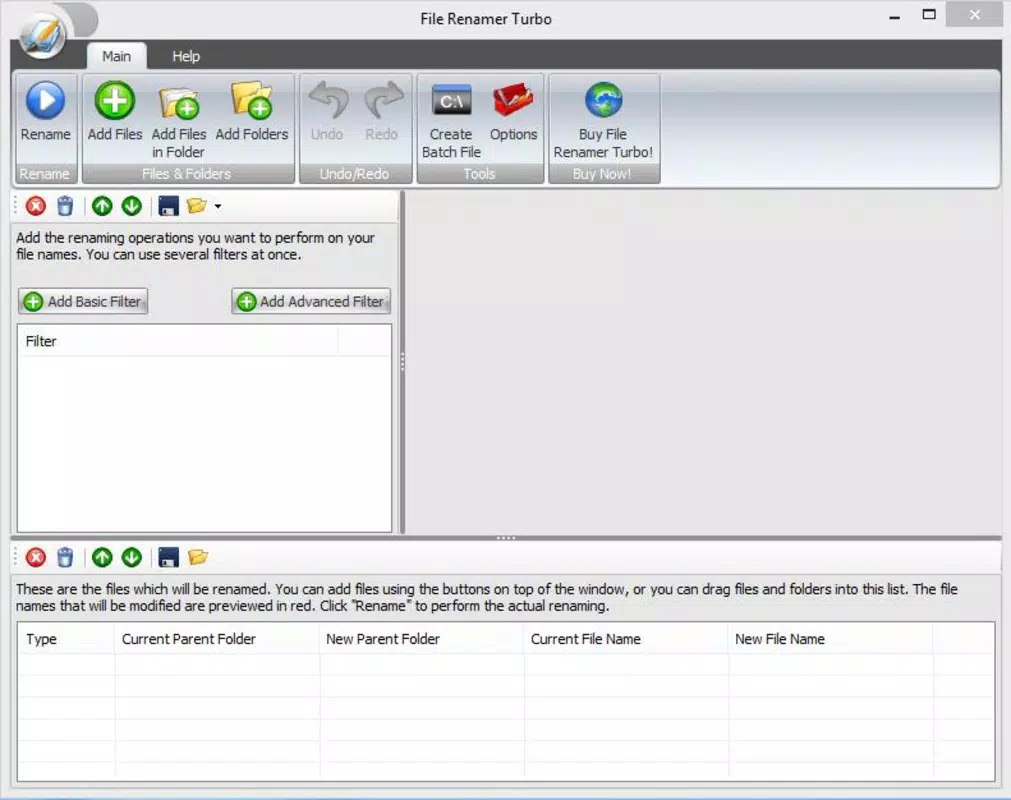
The user interface of File Renamer Turbo is designed with functionality over flair, prioritizing accessibility and ease of use. Navigation is straightforward, allowing users to select files, apply filters, and execute renaming operations through a clean, step-by-step process. The layout is intuitive, with clearly labeled options and minimal visual clutter.
Although the developer did not list formal performance metrics, the app appears to handle file operations efficiently on a range of devices, maintaining responsiveness even with large file sets. Stability is implied by the app’s long-standing presence in the market, suggesting consistent performance over time. The interface adapts well to different screen sizes, ensuring usability across various smartphone models.
While specific information about memory usage or processing speed was not provided, the app’s ability to process multiple files without apparent lag indicates optimized backend operations. Users can expect smooth interactions during file selection and renaming, with minimal delay between actions. The overall experience reflects a mature utility built for practicality rather than aesthetics, aligning with the expectations of users focused on efficiency.
Platform Compatibility & Technical Requirements
File Renamer Turbo is available on Android, with the latest version supporting the platform. The app has a file size of 1.2 MB, making it lightweight and suitable for devices with limited storage. The developer did not specify minimum OS requirements or version compatibility details.
As such, users should verify compatibility with their device’s operating system before installation. No information was provided regarding iOS availability, so the app may be exclusive to Android. The lack of detailed technical specifications means that users should exercise caution when installing on older or less common devices.
Despite this, the small file size suggests broad compatibility across modern Android devices. For users seeking a secure, lightweight tool for file management, the app’s minimal footprint is a notable advantage. However, the absence of formal compatibility details limits definitive claims about device support.
Pros and Cons
Pros
- Efficient bulk renaming for large file sets
- Supports customizable filters and search/replace functions
- Online tag retrieval for music files enhances metadata accuracy
- Lightweight size at just 1.2 MB
- Long-standing presence in the market indicates reliability
Cons
- Developer did not provide detailed system requirements
- No information on iOS availability
- Interface design is minimal and may lack visual appeal
- Specific performance metrics were not disclosed
- Compatibility with older Android versions is unclear
FAQ
Is File Renamer Turbo safe to download and install?
The app is available through official channels and has been in use since 2013. While the developer did not provide security certifications, its long-term presence suggests a stable and secure utility.
Can I use File Renamer Turbo on iOS devices?
The developer did not specify iOS compatibility. Based on available information, the app appears to be Android-exclusive at this time.
Does File Renamer Turbo require internet access?
Yes, online tag retrieval for music files requires an active internet connection. Other features can function offline.
How often does File Renamer Turbo receive updates?
The developer did not disclose update frequency. The app’s release date was 2013, and no recent version details were provided.
Can I undo a renaming operation?
The app does not include a built-in undo feature. Users are advised to back up files before performing bulk renaming operations.
Final Thoughts + CTA
File Renamer Turbo remains a dependable tool for users seeking to organize their digital files efficiently. Its focus on bulk renaming, customizable filters, and online metadata retrieval makes it a valuable asset for anyone managing multimedia collections. While the interface is functional rather than flashy, its practical design ensures that users can complete tasks quickly and accurately.
The app’s lightweight nature and long-standing presence in the market underscore its reliability and utility. For individuals who frequently deal with disorganized file names—whether photos, music, or documents—this app offers a straightforward, effective solution. If you’re looking for a secure, free, and efficient way to manage your smartphone’s file system, File Renamer Turbo delivers consistent results.
Download File Renamer Turbo now.


